Your point-of-sale (POS) system is the front line of ZATCA compliance. Every retail transaction, restaurant order, and service payment that passes through your POS must generate a ZATCA-compliant electronic invoice. If your POS cannot do this, you are operating outside the law.
This guide lists every ZATCA requirement your POS system must meet for Phase 2 compliance, explains why each requirement matters, and helps you evaluate whether your current system qualifies or needs replacement.
The Complete ZATCA POS Requirements Checklist
Your POS must support every item on this list. Missing even one requirement means the system is not ZATCA-compliant:
- Generate invoices in UBL 2.1 XML format automatically
- Apply digital signatures using X.509 certificates (CSID)
- Generate QR codes with all 9 TLV tags
- Integrate with ZATCA API for clearance and reporting
- Maintain SHA-256 invoice hash chains
- Assign UUID to every invoice
- Support simplified (B2C) and standard (B2B) invoice types
- Handle credit notes and debit notes
- Store Arabic business name for invoice generation
- Print QR codes on thermal receipts (58mm/80mm)
- Support VAT calculation at 15% standard rate
- Handle zero-rated, exempt, and out-of-scope VAT categories
- Prevent invoice modification after generation
- Support offline queuing with automatic retry
Requirement Breakdown
1. UBL 2.1 XML Generation
The most fundamental requirement. Your POS must automatically convert every transaction into a structured XML document following the UBL 2.1 standard with Saudi-specific extensions. This is not something a cashier does manually — it happens in the background every time a sale is completed. For technical details on the XML structure, see our ZATCA XML format guide.
2. Digital Signature Capability
Every invoice XML must be digitally signed before submission. Your POS needs to store the ZATCA production certificate securely and apply cryptographic signatures automatically. The signing uses the Elliptic Curve Digital Signature Algorithm (ECDSA) with a certificate issued by ZATCA.
3. QR Code Generation
The POS must generate a QR code for every invoice containing 9 TLV-encoded tags including cryptographic data. The QR code must be printable on thermal receipt paper at a size that allows reliable scanning. Phase 2 QR codes are denser than Phase 1 due to the additional cryptographic tags. Read our ZATCA QR code requirements guide for full specifications.
4. ZATCA API Integration
The POS must communicate with ZATCA's servers. B2B invoices go through the clearance endpoint, B2C invoices through the reporting endpoint. The system must handle successful responses, rejections, warnings, and errors from the API. Our API integration guide covers the technical details.
5. Invoice Hash Chain
Each invoice must contain a SHA-256 hash of the previous invoice. This creates a chain that makes it impossible to delete or modify individual invoices without detection. Your POS must securely maintain this chain across all transactions.
6. Offline Mode with Auto-Sync
Internet connectivity is not always reliable, especially in retail environments. Your POS should continue generating invoices when offline, queue them locally, and automatically submit them to ZATCA when connectivity returns. For B2C invoices, the 24-hour reporting window provides sufficient buffer.
Why Offline Mode Matters
A POS that stops working when the internet drops is a business risk. During peak hours, you cannot tell customers to wait while you troubleshoot a network issue. A proper ZATCA POS system handles internet outages gracefully — sales continue uninterrupted and invoices sync later.
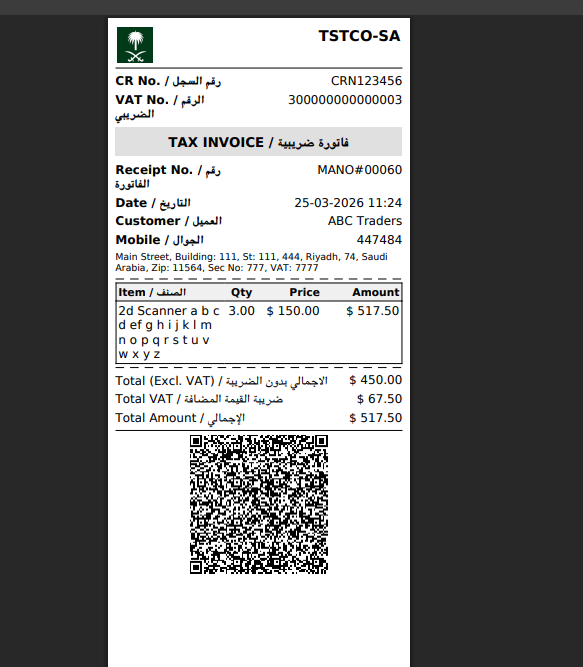
ZATCA-compliant 80mm thermal receipt with QR code
What Does NOT Meet ZATCA Requirements?
- Traditional cash registers (no XML capability)
- Excel or Google Sheets billing (not structured data)
- PDF-only invoice generators (not machine-readable)
- Phase 1-only POS systems (no API integration)
- Generic international POS without Saudi-specific features
- Manual handwritten invoices (obviously non-compliant)
Evaluating Your Current POS
Ask your POS vendor these questions to determine if your system is ZATCA Phase 2 ready:
| Question | Expected Answer | Red Flag |
|---|---|---|
| Does the POS generate UBL 2.1 XML? | Yes, automatically for every sale | "We generate PDF invoices" |
| Does it support ZATCA digital signatures? | Yes, with X.509 certificate management | "What is a digital signature?" |
| Does it integrate with ZATCA API? | Yes, both clearance and reporting | "We are working on it" |
| Does it generate Phase 2 QR codes? | Yes, full 9-tag TLV encoding | "We have basic QR codes" |
| Does it work offline? | Yes, with automatic sync queue | "You need internet" |
| Has it passed ZATCA compliance testing? | Yes, with production CSID | "We haven't tested yet" |
Industry-Specific POS Considerations
Retail Shops
High transaction volume means your POS must generate signatures and QR codes fast. A delay of even 2–3 seconds per transaction adds up during peak hours. The system should also handle barcode scanning, inventory tracking, and multiple payment methods alongside ZATCA compliance.
Restaurants and Cafes
Kitchen display integration, table management, and modifier handling must work alongside ZATCA invoicing. The POS should generate a compliant invoice for every order — including split bills and partial payments.
Service Businesses
Service providers often issue both B2B and B2C invoices. Your POS must handle both invoice types through the correct ZATCA endpoints (clearance for B2B, reporting for B2C) and include the appropriate buyer information for each type.
Wholesale and Distribution
B2B-heavy businesses need robust clearance support. Since B2B invoices must be cleared by ZATCA before delivery, the POS must handle clearance delays gracefully and provide clear status visibility to staff.
Watch: ZATCA POS onboarding and compliance testing
LookPOS Meets Every Requirement
LookPOS is built from the ground up for Saudi e-invoicing compliance. UBL 2.1 XML, digital signatures, 9-tag QR codes, ZATCA API integration, hash chains, offline mode, credit notes — everything is included and maintained. Works for retail, restaurants, services, and wholesale.
Get a POS That Is Already ZATCA-Compliant
Stop worrying about whether your POS meets ZATCA requirements. LookPOS handles all compliance automatically — so you can focus on serving customers.
Start Free Trial Ask UsFrequently Asked Questions
Your POS must generate UBL 2.1 XML invoices, apply digital signatures using X.509 certificates, produce QR codes with 9 TLV-encoded tags, integrate with ZATCA's clearance and reporting API, maintain SHA-256 hash chains, and support credit/debit note workflows.
No. Only POS systems specifically designed or upgraded for ZATCA Phase 2 can generate compliant invoices. Generic POS systems, cash registers, and manual billing solutions do not meet the technical requirements for XML generation, digital signatures, and API integration.
Internet is required for submitting invoices to ZATCA. However, a well-designed POS should work offline during connectivity issues — generating compliant invoices locally and syncing them when the connection is restored. The 24-hour reporting window for B2C invoices provides buffer for temporary outages.
Costs vary widely. Cloud-based POS solutions like LookPOS offer affordable monthly subscriptions that include ZATCA compliance, updates, and support. The cost of a compliant POS is significantly less than the penalties for non-compliance (5,000–50,000 SAR per violation).