Every electronic invoice issued in Saudi Arabia must include a QR code. This is not optional. The Zakat, Tax and Customs Authority (ZATCA) has defined precise technical specifications for what information the QR code must contain, how it must be encoded, and where it must appear on the invoice. Getting any of these details wrong can result in invoice rejection and potential penalties.
This guide covers every aspect of ZATCA QR code requirements so your business can ensure full compliance. Whether you are a developer building an integration, a business owner choosing a POS system in Saudi Arabia, or an accountant verifying your invoicing setup, this article gives you the complete picture.
What Is a ZATCA QR Code?
A ZATCA QR code is a machine-readable two-dimensional barcode that appears on every electronic invoice. It contains encoded transaction data that allows anyone scanning the code to verify the invoice's authenticity and basic details. ZATCA mandates this QR code as part of their e-invoicing regulations for Saudi Arabia.
The QR code serves multiple purposes:
- Consumer verification: Customers can scan the QR code with a mobile phone to verify the invoice is legitimate and registered with ZATCA
- Government validation: ZATCA inspectors can instantly verify invoice data during audits without accessing your system
- Digital integrity: The cryptographic data embedded in Phase 2 QR codes proves the invoice has not been tampered with after issuance
- Supply chain trust: Business partners can verify your invoices are ZATCA-cleared before accepting them
TLV Encoding: The Technical Foundation
ZATCA does not use plain text in QR codes. Instead, all data is encoded using the Tag-Length-Value (TLV) format. This is a structured binary encoding method where each piece of information is stored as:
- Tag: A single byte identifying the data field (1 through 9)
- Length: A single byte specifying the length of the value in bytes
- Value: The actual data encoded in UTF-8
All TLV fields are concatenated into a single binary string, which is then Base64 encoded and rendered as a QR code image. This encoding method ensures the QR code remains compact enough to scan reliably even on small thermal receipts.
The 9 ZATCA QR Code Tags
| Tag | Field Name | Description | Phase 1 | Phase 2 |
|---|---|---|---|---|
| 1 | Seller Name | Business name in Arabic | Required | Required |
| 2 | VAT Number | 15-digit VAT registration number | Required | Required |
| 3 | Timestamp | Invoice date and time (ISO 8601) | Required | Required |
| 4 | Total with VAT | Invoice total including VAT | Required | Required |
| 5 | VAT Amount | Total VAT amount | Required | Required |
| 6 | Invoice Hash | SHA-256 hash of the XML invoice | — | Required |
| 7 | ECDSA Signature | Digital signature of the invoice | — | Required |
| 8 | Public Key | Public key for signature verification | — | Required |
| 9 | Certificate Stamp | Certificate authority signature stamp | — | Required |
Phase 1 vs Phase 2
Phase 1 QR codes contain only tags 1–5 (seller name, VAT number, timestamp, total, VAT amount). Phase 2 QR codes contain all 9 tags including the cryptographic elements. If your business is in Phase 2, tags 6–9 are mandatory and their absence will cause invoice rejection.
Phase 1 QR Code Requirements (B2C Only)
Under Phase 1, QR codes were required only on simplified tax invoices (B2C transactions). Standard tax invoices (B2B) did not require a QR code during Phase 1. The QR code needed to contain only the first five TLV tags.
While Phase 1 is technically superseded by Phase 2 for businesses that have been notified, many smaller businesses still operate under Phase 1 requirements until their integration wave arrives. Regardless, your ZATCA-compliant POS system should already support the full Phase 2 QR code specification so you are ready when your notification comes.
Phase 2 QR Code Requirements (B2B and B2C)
Phase 2 significantly expanded QR code requirements. The key changes:
- QR codes are now required on both B2B and B2C invoices — this is a major change from Phase 1
- Cryptographic tags 6–9 are mandatory including the invoice hash, digital signature, public key, and certificate stamp
- The QR code is generated after XML signing because tags 6–9 depend on the signed XML document
- The Base64 string is significantly longer due to cryptographic data, resulting in a denser QR code image
Common Error
Many businesses generate the QR code before applying the digital signature. This produces a QR code with empty or incorrect signature tags, which ZATCA will reject. The correct sequence is: build XML → sign XML → extract hash and signature → generate TLV → encode QR.
QR Code Generation Process
Here is the step-by-step process for generating a ZATCA-compliant QR code under Phase 2:
- Complete the invoice XML with all mandatory fields in UBL 2.1 format
- Apply the digital signature using your ZATCA production certificate (X.509)
- Compute the invoice hash (SHA-256) from the signed XML
- Extract the ECDSA signature from the signed XML document
- Retrieve your public key from the production certificate
- Get the certificate stamp from the certificate authority
- Encode all 9 tags in TLV format concatenating them in order
- Base64 encode the TLV byte array
- Render the Base64 string as a QR code image
Example TLV Structure
Simplified vs Standard Invoice QR Codes
While both invoice types require QR codes under Phase 2, there are differences in how they are processed:
| Aspect | Simplified (B2C) | Standard (B2B) |
|---|---|---|
| QR Code Tags | All 9 tags | All 9 tags |
| When Generated | After XML signing | After clearance from ZATCA |
| Submission | Reported within 24 hours | Cleared before delivery |
| Customer Use | Walk-in consumers scan to verify | Business partners validate authenticity |
| Printed On | Thermal receipts, POS printouts | A4 invoices, formal documents |
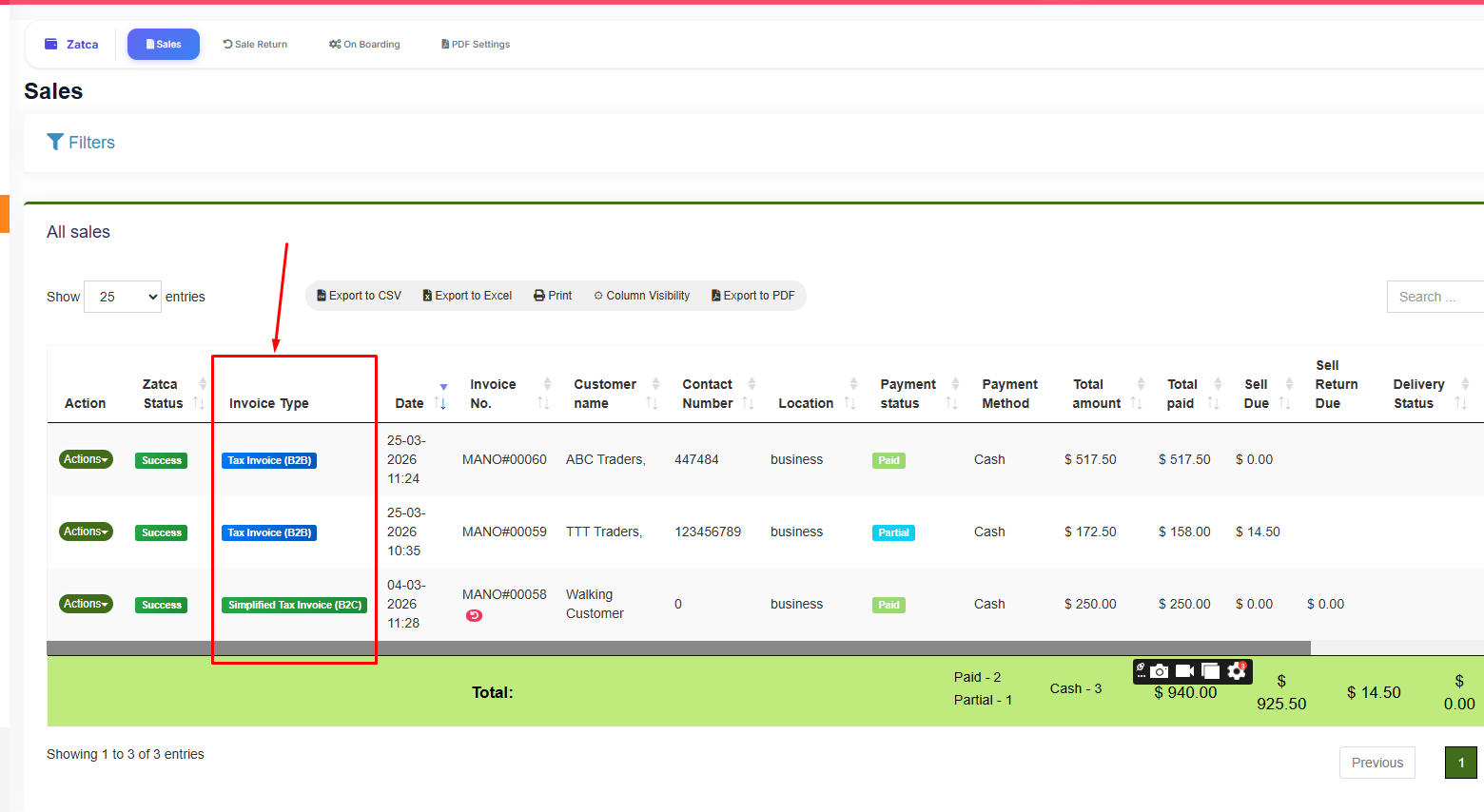
B2B and B2C invoices with different QR code requirements
QR Code Display Requirements
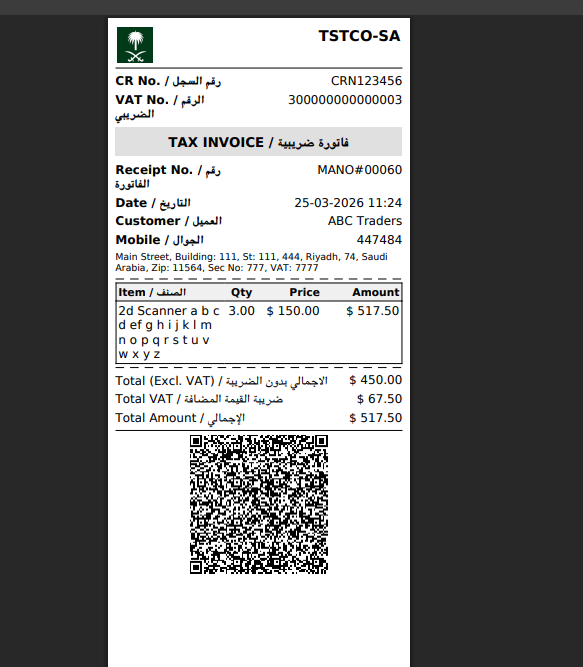
Sample 80mm thermal receipt showing ZATCA-compliant QR code
Beyond the data content, ZATCA also has requirements for how the QR code appears on the printed invoice:
- Minimum size: The QR code must be large enough to scan reliably. For thermal receipts (58mm or 80mm width), ZATCA recommends at least 2cm x 2cm
- Print quality: The QR code must be printed clearly with sufficient contrast. Faded or smudged QR codes that cannot be scanned may result in non-compliance
- Placement: The QR code should be prominently placed on the invoice, typically at the bottom of the receipt or in a designated area of A4 invoices
- No obstructions: Other invoice elements must not overlap or partially cover the QR code
LookPOS Handles This Automatically
Businesses using ZATCA-compliant POS systems like LookPOS can automatically generate QR codes with all 9 TLV tags, proper encoding, and optimized sizing for every print format — 58mm thermal, 80mm thermal, A4, and A3. No manual QR generation needed.
Common QR Code Errors and How to Fix Them
Error: QR Code Validation Failed
This typically means your TLV encoding is incorrect. Check that each tag uses the correct tag number, the length byte accurately reflects the value length, and all 9 tags are present for Phase 2 invoices.
Error: Invalid Signature in QR
The signature in tag 7 does not match the invoice content. This happens when the QR is generated before signing, or when the XML is modified after signing. Ensure you generate the QR code only after the final signed XML is produced.
Error: Seller Name Not in Arabic
Tag 1 (seller name) must contain Arabic text. If your system encodes the English business name in tag 1, the QR code will fail ZATCA validation. Ensure your business profile has the Arabic company name configured.
Error: QR Code Cannot Be Scanned
This is usually a print quality or size issue. Increase the QR code dimensions, use higher DPI printing, and ensure sufficient quiet zone (white space) around the QR code.
Need a POS System That Handles QR Codes Automatically?
LookPOS generates ZATCA-compliant QR codes with full TLV encoding, digital signatures, and proper sizing for every invoice format. Zero technical setup required.
Start Free Trial Ask an ExpertTesting and Validating Your QR Codes
Before going live with ZATCA Phase 2, you should validate your QR codes thoroughly:
- Use the ZATCA sandbox environment to submit test invoices and verify QR code acceptance
- Scan QR codes with a standard mobile phone camera to verify the Base64 string is readable
- Decode the Base64 and parse the TLV tags to confirm all fields are present and correctly encoded
- Verify the digital signature by extracting the public key from tag 8 and validating the signature in tag 7 against the hash in tag 6
- Test across different print formats — ensure QR codes are scannable on 58mm thermal, 80mm thermal, and A4 paper
If you are using a ZATCA-integrated system like LookPOS, these validations are performed automatically during the onboarding process. The system tests QR code generation as part of the compliance certification before switching to production mode.
QR Codes for Credit Notes and Debit Notes
Credit notes (for refunds or returns) and debit notes (for corrections) also require ZATCA-compliant QR codes. The QR code on a credit note must reference the original invoice and contain the same 9 TLV tags with the credit note's own data. This ensures the refund transaction is equally traceable and verifiable.
Frequently Asked Questions
A ZATCA-compliant QR code must contain the seller name (Arabic), VAT registration number, invoice timestamp, total amount with VAT, and VAT amount. Under Phase 2, it must also include the invoice hash (SHA-256), digital signature (ECDSA), public key, and certificate stamp — totaling 9 mandatory TLV tags.
ZATCA uses Tag-Length-Value (TLV) encoding. Each data field is encoded with a tag number (1–9), the length of the value in bytes, and the actual value. The complete TLV binary structure is then Base64 encoded and rendered as a QR code image.
Under Phase 1, QR codes were mandatory only on simplified (B2C) invoices. Under Phase 2, QR codes are required on both simplified and standard invoices. If your business is operating under Phase 2, every invoice you issue must carry a QR code with all 9 TLV tags.
Technically possible but not practical. Phase 2 QR codes require cryptographic data (hash, signature, public key, certificate stamp) that can only be generated after digitally signing the XML invoice. This requires automated software. Using a ZATCA-compliant POS system is the only reliable approach for businesses.
Missing or invalid QR codes are a ZATCA violation. Penalties range from 5,000 SAR to 50,000 SAR per violation. Additionally, the invoice may be rejected by the ZATCA platform during clearance (B2B) or flagged during reporting (B2C), meaning the transaction is not officially recorded.