If you run a business in Saudi Arabia, you have likely heard about ZATCA e-invoicing. But what does it actually mean? How does it affect your day-to-day operations? And what do you need to do about it? This article explains ZATCA e-invoicing in plain language, without technical jargon, so every business owner can understand exactly what is required.
ZATCA E-Invoicing in Plain Language
ZATCA stands for the Zakat, Tax and Customs Authority — the government body in Saudi Arabia responsible for tax collection and regulation. E-invoicing (electronic invoicing) means generating invoices digitally using a computer system instead of writing them by hand or creating them in Word or Excel.
But ZATCA e-invoicing goes further than just typing an invoice on a computer. It requires that invoices be:
- Generated in a specific digital format (XML) that machines can read and process
- Digitally signed to prove they haven't been tampered with
- Transmitted to ZATCA for validation and record-keeping
- Include a QR code that anyone can scan to verify the invoice
What Is NOT an E-Invoice
ZATCA is very clear: a scanned paper invoice, a PDF, a Word document, or an Excel spreadsheet is NOT an electronic invoice. Even if you email a PDF to your customer, that does not count as e-invoicing. The invoice must be generated by a compliant system in the structured XML format ZATCA requires.
Why Did Saudi Arabia Mandate E-Invoicing?
Saudi Arabia introduced e-invoicing as part of Vision 2030, the national transformation plan. The goals behind the mandate include:
- Reducing tax evasion: When every invoice is reported to ZATCA, it becomes much harder for businesses to hide revenue or inflate expenses
- Improving VAT collection: ZATCA can cross-reference buyer and seller invoices in real-time to identify discrepancies
- Modernizing the economy: Digital invoicing reduces paperwork, speeds up payments, and improves business efficiency
- International alignment: Saudi Arabia joins over 80 countries that have implemented e-invoicing mandates
- Consumer protection: QR codes on invoices let consumers verify that businesses are tax-compliant
Who Must Comply?
Every business registered for VAT in Saudi Arabia must comply with ZATCA e-invoicing. This includes:
- Large corporations
- Small and medium enterprises (SMEs)
- Sole proprietors and freelancers (if VAT-registered)
- Foreign companies with a Saudi tax presence
- Retailers, restaurants, service providers — any business issuing invoices
There are no exemptions based on industry or business size. If you are registered for VAT, you must issue electronic invoices using a compliant system.
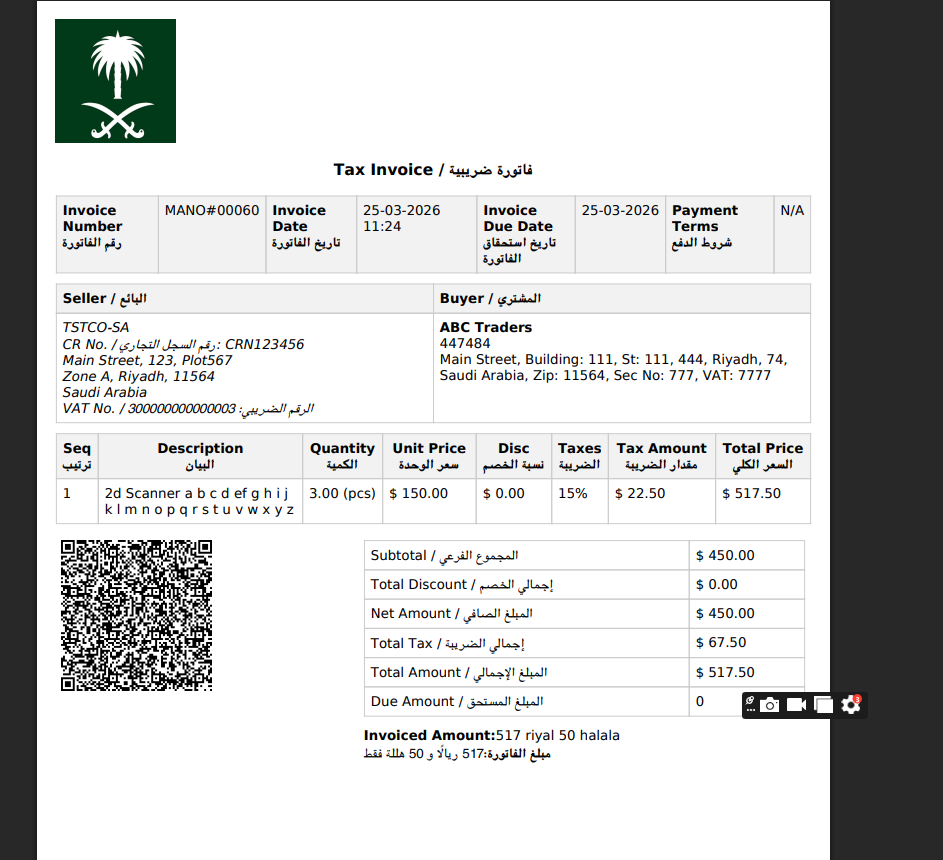
Example of a ZATCA-compliant electronic tax invoice
The Two Types of E-Invoices
ZATCA defines two types of electronic invoices, each with different rules:
| Feature | Simplified Tax Invoice (B2C) | Standard Tax Invoice (B2B) |
|---|---|---|
| Used For | Sales to individuals (consumers) | Sales to other businesses |
| Buyer Info Required | Buyer name/VAT not required | Buyer name + VAT number required |
| QR Code | Required (all phases) | Required (Phase 2 only) |
| ZATCA Submission | Reported within 24 hours | Must be cleared before delivery |
| Common Uses | Retail, restaurants, fuel stations | Wholesale, services, contracts |
If your business sells to consumers at a point of sale, most of your invoices will be simplified tax invoices. If you sell to other businesses, you will issue standard tax invoices. Many businesses issue both types.
What Are the Two Phases?
Phase 1: Generation Phase (Started December 4, 2021)
Phase 1 required all VAT-registered businesses to switch from manual to electronic invoicing. Invoices had to be generated by a compliant electronic system (not handwritten, not PDF). However, businesses did not need to connect to ZATCA — invoices were generated and stored locally.
Phase 2: Integration Phase (Started January 1, 2023 — Ongoing in Waves)
Phase 2 is the major change. It requires businesses to integrate their invoicing systems directly with ZATCA's platform. B2B invoices must be cleared by ZATCA before being sent to the buyer, and B2C invoices must be reported within 24 hours. For a detailed technical breakdown, read our complete ZATCA Phase 2 guide.
What Does Your Business Need?
To comply with ZATCA e-invoicing, your business needs:
1. A Compliant Invoicing or POS System
Your invoicing software or POS system must be ZATCA-compliant. It must generate invoices in UBL 2.1 XML format, apply digital signatures, generate QR codes, and integrate with ZATCA's API. Not all software does this — you need a system specifically built or updated for ZATCA compliance.
2. ZATCA Digital Certificate
Your invoicing system needs a digital certificate from ZATCA (called a Cryptographic Stamp Identifier or CSID). This certificate is used to digitally sign every invoice your system generates, proving it came from your business and has not been modified.
3. Internet Connectivity
Phase 2 requires your system to communicate with ZATCA's servers. Your invoicing device or server needs a reliable internet connection. For retail businesses, your e-invoicing system should be able to queue invoices when offline and sync them when connectivity returns.
4. Arabic Business Name
Your business name must be available in Arabic in your system. The QR code on every invoice encodes your business name in Arabic (Tag 1 of the TLV structure). If your system only has the English name, QR codes will fail validation.
Simplest Path to Compliance
The fastest way for most businesses to achieve ZATCA compliance is to adopt a POS or invoicing system that already includes ZATCA integration. Systems like LookPOS handle the XML format, digital signatures, QR codes, and ZATCA API communication automatically — you just make sales as normal and the system handles the rest.
What Happens on a Typical Sale?
Here is what happens behind the scenes when you make a sale using a ZATCA-compliant system:
- You ring up the sale on your POS system as normal — scan items, apply discounts, collect payment
- The system generates the invoice in UBL 2.1 XML format with all required fields
- The XML is digitally signed using your ZATCA certificate
- A QR code is generated from the signed invoice data
- The invoice is printed/emailed to the customer with the QR code visible
- The invoice is transmitted to ZATCA — immediately for B2B (clearance), or within 24 hours for B2C (reporting)
- ZATCA validates and stores the invoice in the national tax system
From the business owner's perspective, the process feels identical to making a normal sale. All the technical complexity happens automatically in the background.
Watch: ZATCA e-invoicing onboarding and testing demo
Ready to Make Your Business ZATCA-Compliant?
LookPOS is a complete POS and e-invoicing solution built for Saudi Arabia. ZATCA Phase 2 compliance is built in — just install and start selling.
Start Free Trial Chat With UsCommon Misconceptions
"I already email PDF invoices — that should count"
No. PDFs are not structured data that ZATCA can process. E-invoicing requires machine-readable XML in a specific format. A PDF is just a picture of an invoice — it cannot be validated, signed, or integrated with ZATCA's systems.
"My business is too small for e-invoicing"
Size does not matter. Every VAT-registered business must comply. Small businesses are being integrated in later waves, but the requirement is the same. Starting early gives you time to transition smoothly.
"I can just hire an accountant to handle it later"
E-invoicing is not an accounting task — it is a technology requirement. Your invoicing system itself must be compliant. An accountant cannot make non-compliant software generate valid ZATCA invoices. You need the right tools.
"E-invoicing is only for large companies"
ZATCA applies the same standard to all VAT-registered businesses. The only difference is the timeline — larger companies were required to comply first. Small businesses, freelancers, and home-based businesses are all included.
Frequently Asked Questions
All VAT-registered businesses in Saudi Arabia, regardless of size, industry, or business type. This includes corporations, SMEs, sole proprietors, and foreign entities with a Saudi VAT registration.
No. ZATCA explicitly excludes scanned invoices, PDFs, Word documents, and Excel files from the definition of electronic invoices. A compliant e-invoice must be generated in UBL 2.1 XML format by a certified system.
Yes. You need a POS system or invoicing software that supports UBL 2.1 XML generation, digital signatures using X.509 certificates, TLV-encoded QR codes, and ZATCA API integration. Systems like LookPOS include all of this out of the box.
Penalties range from 5,000 SAR to 50,000 SAR per violation. ZATCA typically issues warnings first, but repeat violations lead to escalating fines and potential business suspension. The cost of compliance is far lower than the cost of penalties.
It depends on the app. If your POS app generates proper UBL 2.1 XML, applies digital signatures, and integrates with ZATCA's API, then yes. A basic calculator or note-taking app cannot generate compliant invoices. Choose a mobile POS solution built for ZATCA compliance.