نظام نقاط البيع المتوافق مع زاتكا | برنامج الفوترة الإلكترونية المعتمد في السعودية
Generate ZATCA-approved electronic invoices, automate Phase 2 integration, and stay fully compliant with Saudi Arabia's e-invoicing regulations. Trusted by retail stores, restaurants, and businesses across the Kingdom.
See our ZATCA compliant POS system in action with live e-invoicing
ZATCA E-Invoicing Demo - Phase 2 Compliant POS System
The Zakat, Tax and Customs Authority (ZATCA) has transformed how businesses in Saudi Arabia handle invoicing. As part of the Kingdom's Vision 2030 initiative, ZATCA introduced mandatory electronic invoicing regulations that apply to every VAT-registered business operating in Saudi Arabia. Whether you run a small grocery shop in Riyadh, a restaurant chain in Jeddah, or a pharmacy in Dammam, compliance is no longer optional. It is a legal requirement that directly affects your ability to operate.
Non-compliance carries significant consequences, including financial penalties that can reach up to 50,000 SAR per violation. Beyond penalties, businesses that fail to generate proper e-invoices risk losing the trust of their customers and business partners. With ZATCA Phase 2 now in full effect, businesses must integrate their invoicing systems directly with the ZATCA Fatoora platform, ensuring every invoice is validated and reported in real time.
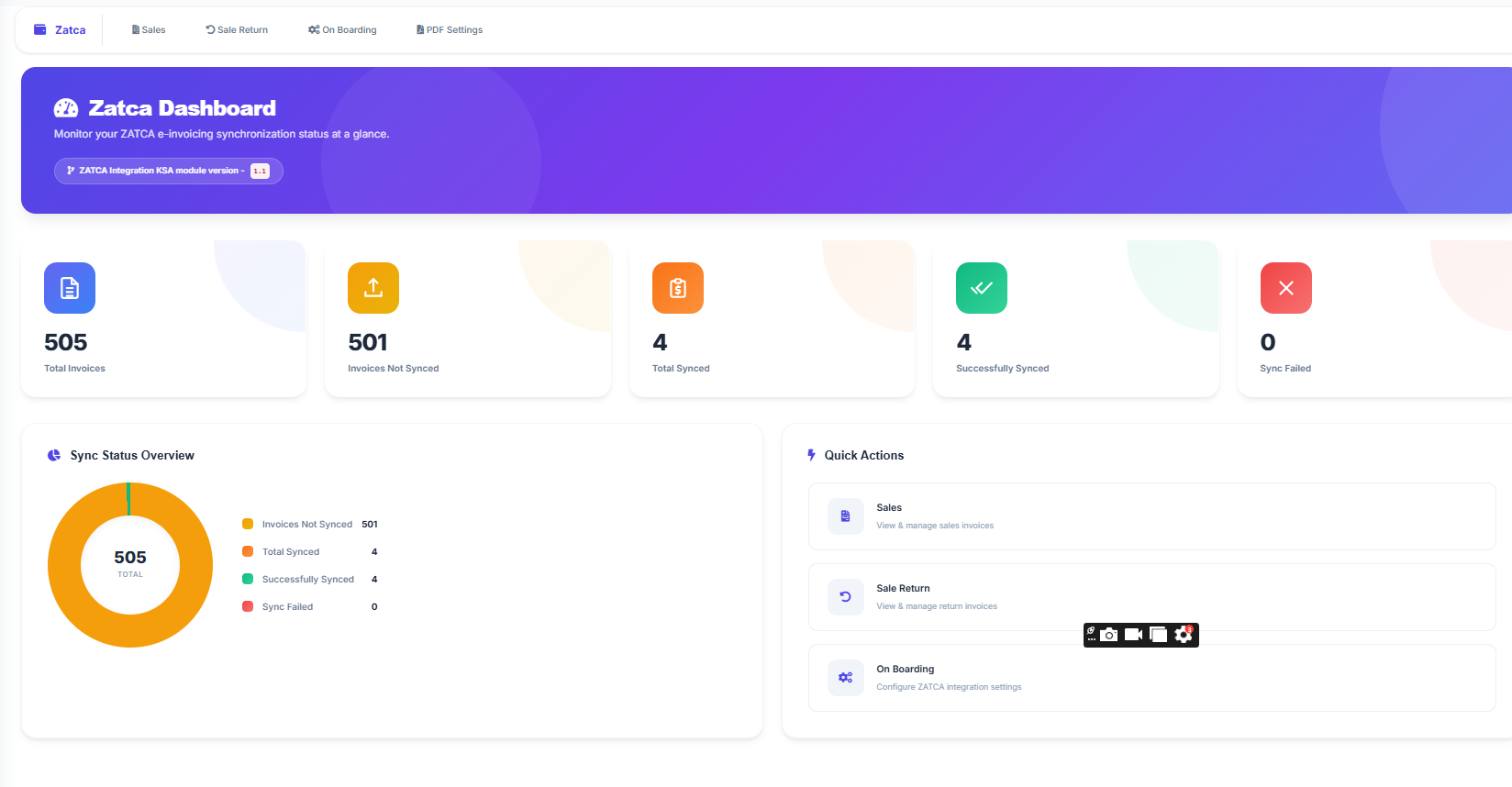
LookPOS provides a complete ZATCA-compliant POS system designed specifically for businesses in Saudi Arabia. Our platform handles everything from generating structured XML invoices to submitting them directly to ZATCA, so you can focus on running your business while we take care of compliance.
ZATCA e-invoicing, known locally as Fatoora, is the electronic invoicing system mandated by the Zakat, Tax and Customs Authority of Saudi Arabia. It replaces traditional paper-based and manually generated invoices with structured, machine-readable electronic documents that follow a standardized format.
The system was rolled out in two main phases to give businesses time to adapt:
In this phase, all VAT-registered taxpayers were required to generate electronic invoices and credit/debit notes using a compliant e-invoicing system. Invoices had to include specific mandatory fields such as the seller's VAT registration number, QR codes for simplified invoices, and a unique invoice identifier. Handwritten invoices and invoices generated through basic text editors were no longer accepted.
Phase 2 is the integration phase where businesses must connect their e-invoicing systems directly to the ZATCA Fatoora platform. This means every invoice generated must be shared with ZATCA in near real time. For B2B (standard) tax invoices, the invoice must be cleared by ZATCA before it can be shared with the buyer. For B2C (simplified) tax invoices, the invoice must be reported to ZATCA within 24 hours of issuance.
The integration phase requires invoices to be in XML or PDF/A-3 format embedded with XML, digitally signed using cryptographic stamps, and transmitted through secure API connections to the ZATCA platform. This is where having a ZATCA-compliant POS system becomes essential for your business.
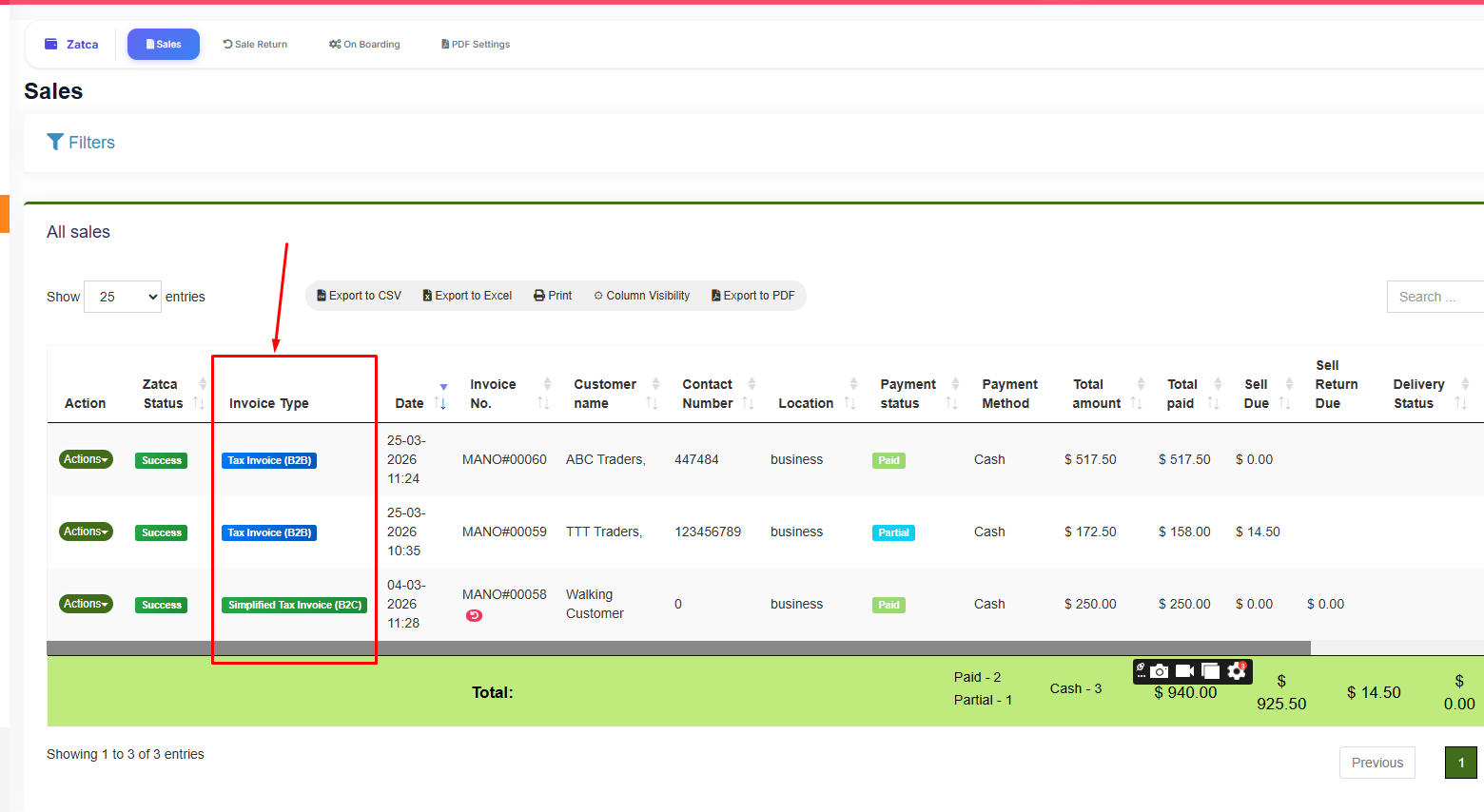
Standard (B2B) and Simplified (B2C) invoice types in ZATCA Phase 2
Many businesses in Saudi Arabia still rely on outdated billing software or manual processes that do not meet ZATCA requirements. Using a non-compliant system puts your business at risk of penalties, audit failures, and operational disruptions.
A dedicated ZATCA POS system automates the entire compliance process. Instead of manually formatting invoices, calculating taxes, and submitting reports, the system handles everything automatically every time you make a sale.
Here is what a proper ZATCA-compliant POS system does for your business:
Everything you need for Saudi e-invoice compliance and efficient business operations
Generate compliant simplified (B2C) and standard (B2B) tax invoices with automatic XML formatting and ZATCA submission
Automatic TLV-encoded QR codes on every invoice containing seller name, VAT number, date, and tax amounts
Direct API connection to the ZATCA Fatoora portal for real-time invoice clearance and reporting
Cryptographic stamps and digital signatures on every invoice to ensure document integrity and authenticity
Real-time stock tracking, low stock alerts, barcode scanning, and multi-location inventory control
Detailed sales, profit, tax, and inventory reports to help you make better business decisions
Store customer details including VAT numbers and addresses for automatic B2B invoice generation
Print invoices on A4, A3, 80mm, or 58mm thermal paper. All formats include ZATCA-required fields and QR codes
Generate ZATCA-compliant credit and debit notes for returns and adjustments with proper references
ZATCA Phase 2 is the most technically demanding aspect of Saudi e-invoicing compliance. It requires your POS system to communicate directly with the ZATCA Fatoora platform through secure API connections. LookPOS handles every technical requirement so you do not have to worry about the complex details.
LookPOS automatically determines whether to generate a simplified tax invoice (B2C) or a standard tax invoice (B2B) based on your customer's information. If the customer has a registered VAT number in the system, LookPOS generates a standard invoice that requires clearance. For walk-in customers without VAT numbers, it generates a simplified invoice for reporting.
Every invoice generated by LookPOS follows the Universal Business Language (UBL) 2.1 standard required by ZATCA. The XML structure includes all mandatory fields: seller and buyer details, line items with correct tax calculations, invoice totals, and reference documents.
LookPOS generates and manages the cryptographic certificates required for invoice signing. During the onboarding process, the system creates a Certificate Signing Request (CSR), obtains compliance certificates from ZATCA, and progresses to production certificates. Every invoice is digitally signed before submission to ensure tamper-proof integrity.
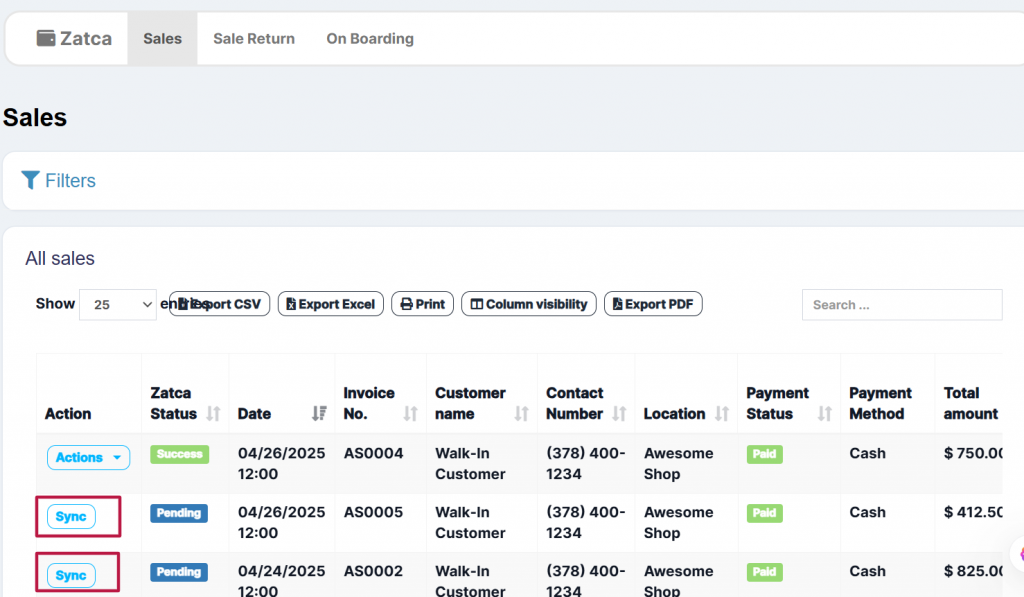
When you complete a sale, LookPOS immediately processes the invoice and submits it to ZATCA. Standard invoices are sent for clearance before delivery to the buyer. Simplified invoices are queued for reporting within the required timeframe. The system tracks the status of every submission and alerts you to any issues.
ZATCA requires each invoice to reference the hash of the previous invoice, creating an unbreakable chain of documents. LookPOS maintains this hash chain automatically, ensuring sequential integrity across all your invoices without any manual intervention.
LookPOS serves businesses across every industry in the Kingdom
Every business type benefits differently from a ZATCA-compliant POS. Retail stores gain faster checkout with automatic tax calculations. Restaurants benefit from table management combined with compliant invoicing. Supermarkets handle high transaction volumes with barcode-driven billing. Pharmacies track batch numbers and expiry dates alongside tax compliance. Regardless of your industry, LookPOS adapts to your workflow while keeping you fully compliant with Saudi regulations.
Set up your ZATCA-compliant POS system in four simple steps
Create your LookPOS account, enter your business details, VAT registration number, and Commercial Registration (CR) number.
Generate your ZATCA onboarding OTP from the Fatoora portal and enter it into LookPOS. The system automatically handles certificate generation and compliance verification.
Import your products, set the correct VAT rates (0%, 5%, or 15%), and begin processing sales. Every invoice is automatically ZATCA-compliant.
LookPOS submits every invoice to ZATCA automatically. Monitor submission status, view compliance reports, and access your complete invoice archive anytime.
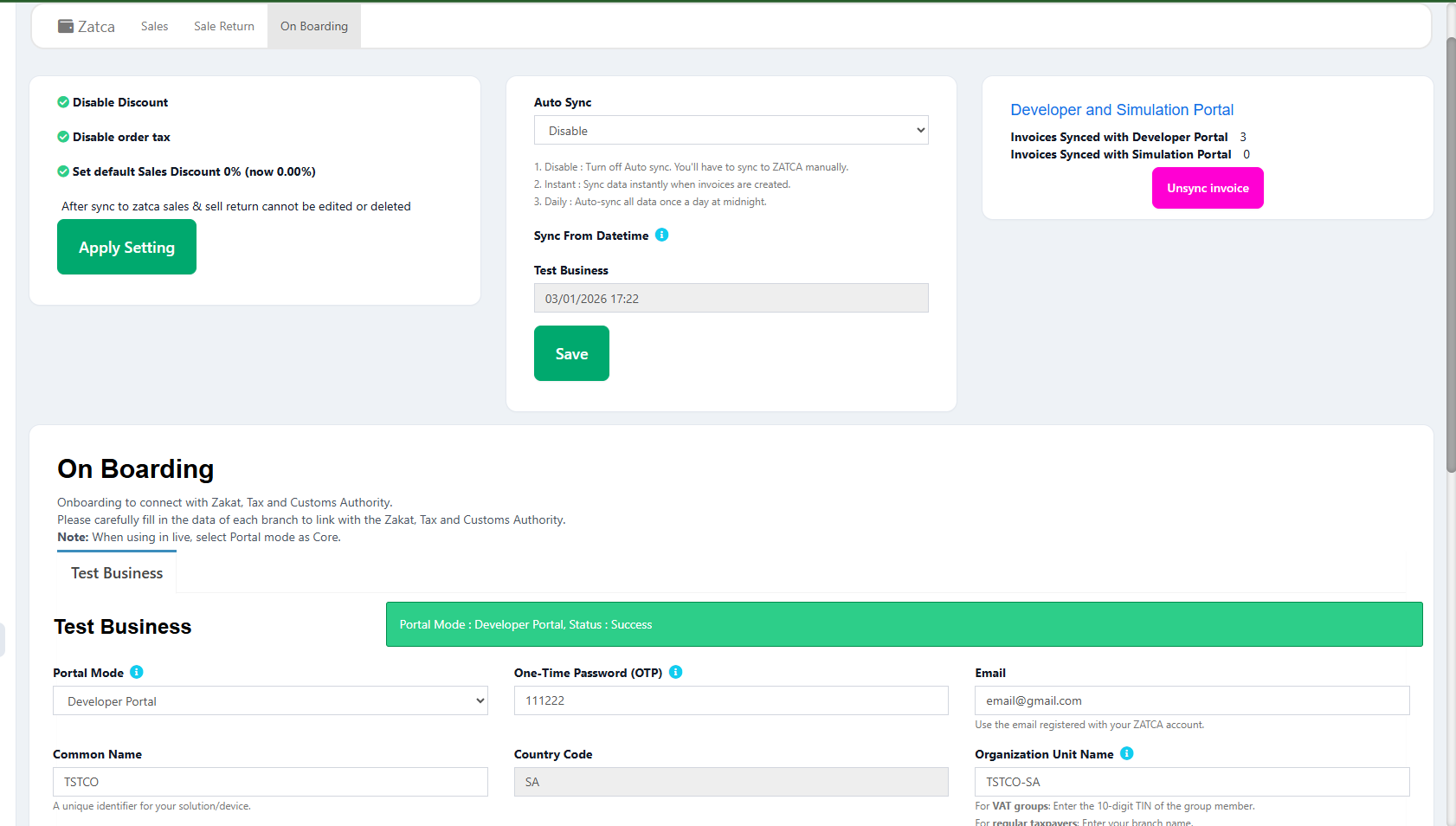
Seamless ZATCA onboarding in under 30 minutes
Step-by-step ZATCA onboarding and compliance testing demonstration
More than just compliance. A complete business management solution.
Phase 1 and Phase 2 compliant with automatic invoice generation, signing, and submission to the Fatoora portal
Get your ZATCA e-invoicing running in under 30 minutes with our guided onboarding process
Full bilingual support for both Arabic and English interfaces, invoices, and reports
Access your business from anywhere. All data is securely stored in the cloud with automatic backups
Expert support team available to help with ZATCA setup, troubleshooting, and ongoing compliance questions
Plans starting from $9.99/month. No hidden fees, no per-invoice charges, no surprise costs
Stay ahead of ZATCA regulation changes with automatic software updates that keep you compliant
Enterprise-grade security with encrypted data transmission and secure certificate management
Make sure your business meets all ZATCA requirements. LookPOS covers every item on this list.
Answers to the most common questions from Saudi business owners
ZATCA e-invoicing (Fatoora) is a mandatory electronic invoicing system introduced by the Zakat, Tax and Customs Authority of Saudi Arabia. All VAT-registered businesses in the Kingdom must comply, regardless of size or industry. Phase 1 required structured electronic invoices since December 2021, and Phase 2 requires real-time integration with the ZATCA Fatoora platform. Non-compliance can result in penalties of up to 50,000 SAR per violation.
Yes, LookPOS is fully compliant with both ZATCA Phase 1 and Phase 2. Our system generates XML invoices in UBL 2.1 format, applies cryptographic stamps and digital signatures, generates TLV-encoded QR codes, and connects directly to the ZATCA Fatoora portal for real-time clearance (B2B) and reporting (B2C). We continuously update our system to match any changes in ZATCA regulations.
Simplified tax invoices are issued for B2C (business-to-consumer) transactions where the buyer is an individual. These invoices are reported to ZATCA within 24 hours. Standard tax invoices are for B2B (business-to-business) transactions where the buyer is another VAT-registered entity. Standard invoices must be cleared by ZATCA before being shared with the buyer. LookPOS automatically detects the correct invoice type based on whether the customer has a VAT registration number in the system.
ZATCA accepts three VAT rates in Saudi Arabia: 0% (zero-rated for certain exports, international transport, and qualifying supplies), 5% (reduced rate applicable to specific categories), and 15% (the standard VAT rate for most goods and services). Your POS system must apply the correct rate to each product or service. LookPOS allows you to configure VAT rates per product and validates them before submission to ZATCA.
Absolutely. LookPOS includes restaurant-specific features like table management, kitchen order printing, split billing, and takeaway ordering. All restaurant transactions generate ZATCA-compliant invoices automatically. Whether you run a small cafe, a fast food outlet, or a full-service restaurant, LookPOS handles your billing and tax compliance seamlessly.
You can have your ZATCA e-invoicing up and running in under 30 minutes. The process involves creating a LookPOS account, entering your business details and VAT number, generating an OTP from the ZATCA Fatoora portal, and entering it into LookPOS. Our system automatically handles certificate generation, compliance verification, and production readiness. Our support team is available to assist you through every step.
Yes, LookPOS automatically generates ZATCA-compliant QR codes on every invoice. The QR code contains TLV (Tag-Length-Value) encoded data including the seller name, VAT registration number, invoice timestamp, total amount with VAT, and VAT amount. These QR codes meet ZATCA specifications for both simplified and standard invoices and can be scanned to verify invoice authenticity.
Join hundreds of businesses across Saudi Arabia that trust LookPOS for their ZATCA e-invoicing needs. Start your free trial today and experience hassle-free compliance.
يُعد نظام نقاط البيع المتوافق مع زاتكا من LookPOS الخيار الأمثل للأعمال التجارية في المملكة العربية السعودية. يوفر النظام حلاً متكاملاً لـالفاتورة الإلكترونية زاتكا يشمل إصدار الفواتير الإلكترونية وإرسالها لمنصة فاتورة تلقائياً مع دعم كامل للمرحلة الثانية.
يدعم برنامج الفوترة الإلكترونية في السعودية من LookPOS جميع متطلبات هيئة الزكاة والضريبة والجمارك بما في ذلك صيغة XML، التوقيع الرقمي، رمز QR، وسلسلة التجزئة. سواء كنت تدير متجراً للبيع بالتجزئة أو مطعماً أو صيدلية أو سوبرماركت، فإن نظامنا يتعامل مع متطلبات المرحلة الثانية من الفاتورة الإلكترونية بالكامل.
ابدأ تجربتك المجانية الآن واحصل على أفضل نظام نقاط بيع في السعودية مع برنامج فاتورة إلكترونية معتمد من زاتكا. التسجيل يستغرق أقل من 30 دقيقة ولا يتطلب أي خبرة تقنية.
Discover our POS software offerings for different industries and regions