Mobile phone retail is unlike any other business. You sell high-value devices with unique serial numbers, manage accessories across dozens of brands, handle repairs with varying warranty statuses, and track inventory worth hundreds of thousands in real-time. Generic retail POS software simply cannot handle these complexities.
Whether you operate a cell phone store in New York, a mobile accessories shop in Dubai, or a smartphone retail chain in London, you need specialized POS software designed for the wireless industry. This guide explores the essential features that make a POS system truly effective for mobile phone retailers worldwide.
Why Mobile Phone Shops Need Specialized POS
Standard retail POS tracks products by SKU and quantity. A grocery store selling apples needs to know how many are in stock. But mobile phone retailers face unique challenges that require sophisticated tracking capabilities.
The IMEI Challenge
Every mobile phone has a unique 15-digit IMEI (International Mobile Equipment Identity) number. This is not just an inventory code—it is a legal identifier that connects to warranty claims, insurance, theft reports, and carrier activation. Your POS must track each device individually, not just count quantities.
Unique Device TrackingConsider this scenario: A customer returns claiming their phone is defective. Without IMEI tracking, you cannot verify if they actually purchased that specific device from your store. With proper IMEI management, you instantly pull up the complete history—purchase date, price paid, warranty status, and any previous service records.
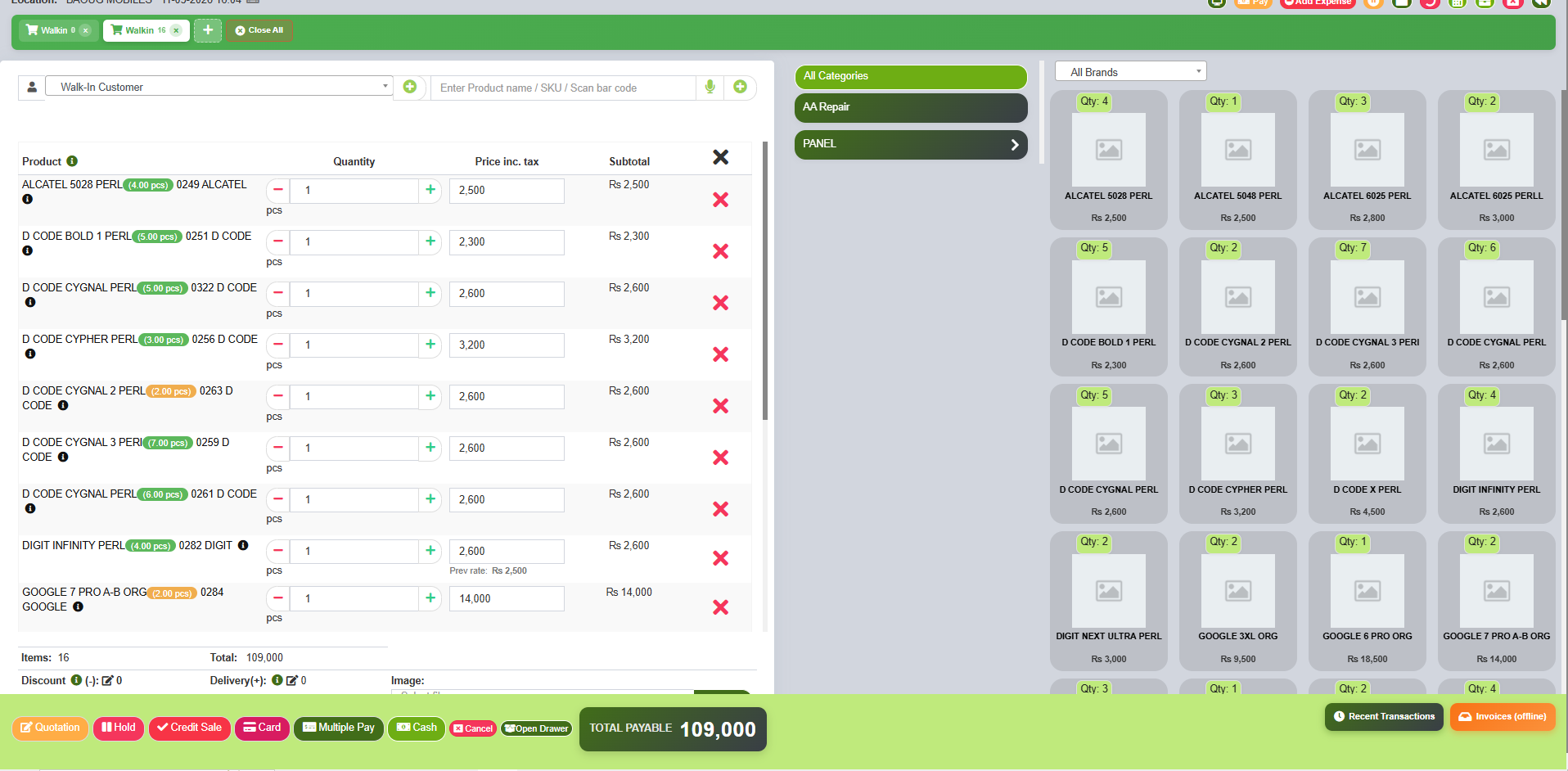
Essential Features for Mobile Phone Shop POS
1. IMEI Number Tracking and Management
The cornerstone of any mobile shop POS is comprehensive IMEI tracking. When you purchase phones from suppliers, the system should capture each IMEI number automatically through barcode scanning or manual entry. This creates a permanent record linking that specific device to your inventory.
IMEI: 353456789012345
Status: New OK
Purchase Date: 2026-03-01
Supplier: ABC Electronics
Cost: $899.00
When that phone sells, the IMEI automatically transfers from available inventory to sold status, with complete customer and transaction details. If someone claims the phone is stolen or you receive a warranty inquiry, you have instant access to the full chain of custody.
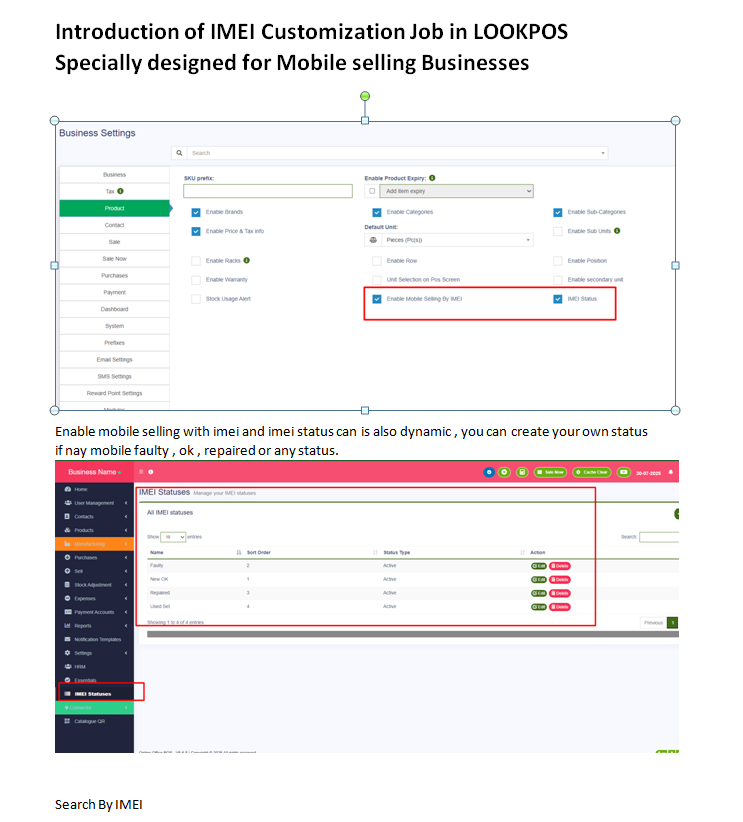
2. Device Status Management
Not all phones in your inventory have the same status. Your POS should support customizable device conditions that affect pricing and warranty terms.
These statuses should be fully customizable based on your business model. Some retailers add categories like "Open Box" or "Demo Unit" with specific pricing rules for each.
3. IMEI Barcode Scanning at Point of Sale
Speed matters in retail. Your POS should support instant IMEI scanning from phone boxes or device labels. When you scan an IMEI barcode, the system should immediately identify the product, show its status, cost, and suggested selling price.
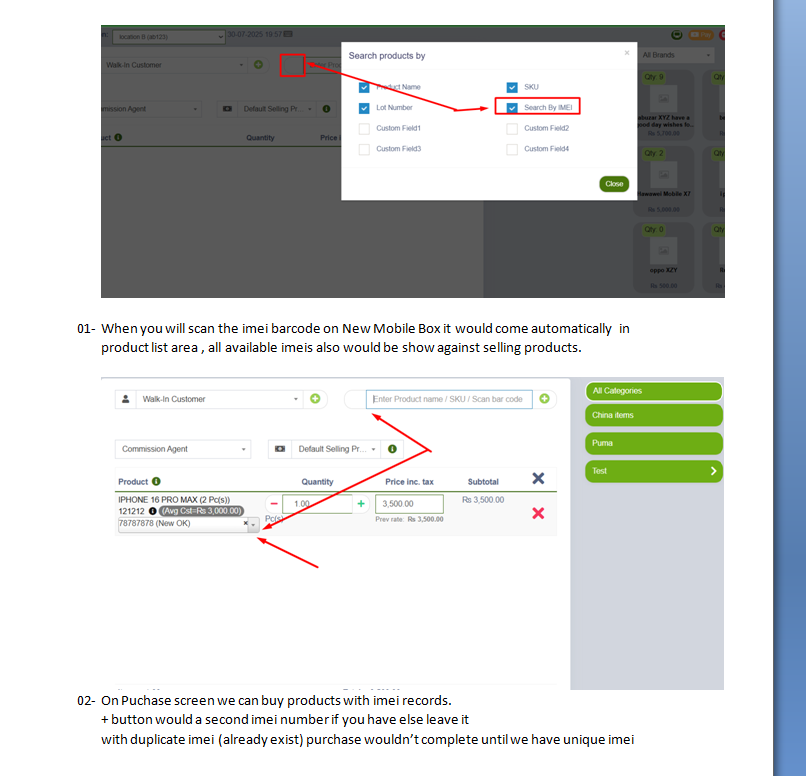
The search should work both ways. If a customer asks about a specific phone, you scan it from your shelf to see availability, cost history, and optimal pricing. If they bring in their own device for trade-in, you scan its IMEI to check carrier status and estimated value.
4. Purchase Management with IMEI Recording
When receiving inventory from suppliers, each device IMEI must be recorded against the purchase invoice. This creates the audit trail that proves your phones are legitimately sourced—essential for insurance, warranty claims, and legal compliance.
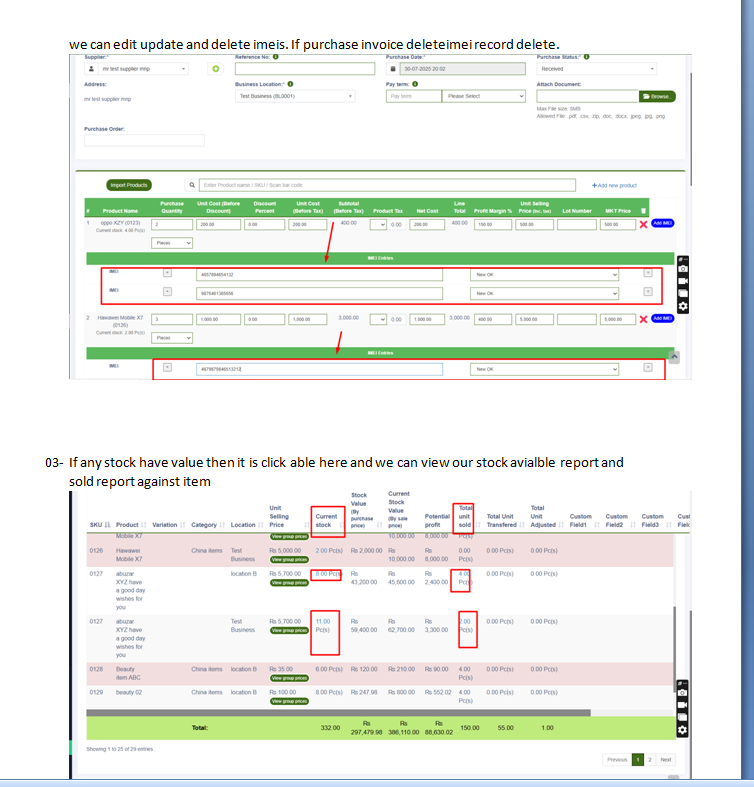
Duplicate IMEI Protection
A sophisticated POS prevents entering duplicate IMEI numbers. If an IMEI already exists in your system, the purchase cannot complete. This prevents inventory errors and flags potential fraud attempts immediately.
5. Available vs Sold IMEI Reporting
Real-time visibility into your IMEI inventory is crucial for business decisions. Your POS should provide comprehensive reports showing available devices by brand, model, and status, along with complete sold history.
These reports help you understand stock aging (which phones have sat too long), brand performance (which manufacturers sell fastest), and margin analysis (where you make the most profit per unit).
6. Accessory and Parts Inventory
Mobile phone shops sell more than just phones. Cases, screen protectors, chargers, earbuds, and repair parts often generate significant revenue. Your POS must handle these standard inventory items alongside IMEI-tracked devices.
Key accessory management features include:
- Brand organization - Group accessories by compatible phone brand
- Category hierarchy - Cases, cables, audio, power banks, screen protection
- Low stock alerts - Never run out of popular items
- Bundle pricing - Sell phone + case + protector as package
- Supplier tracking - Know where each product came from
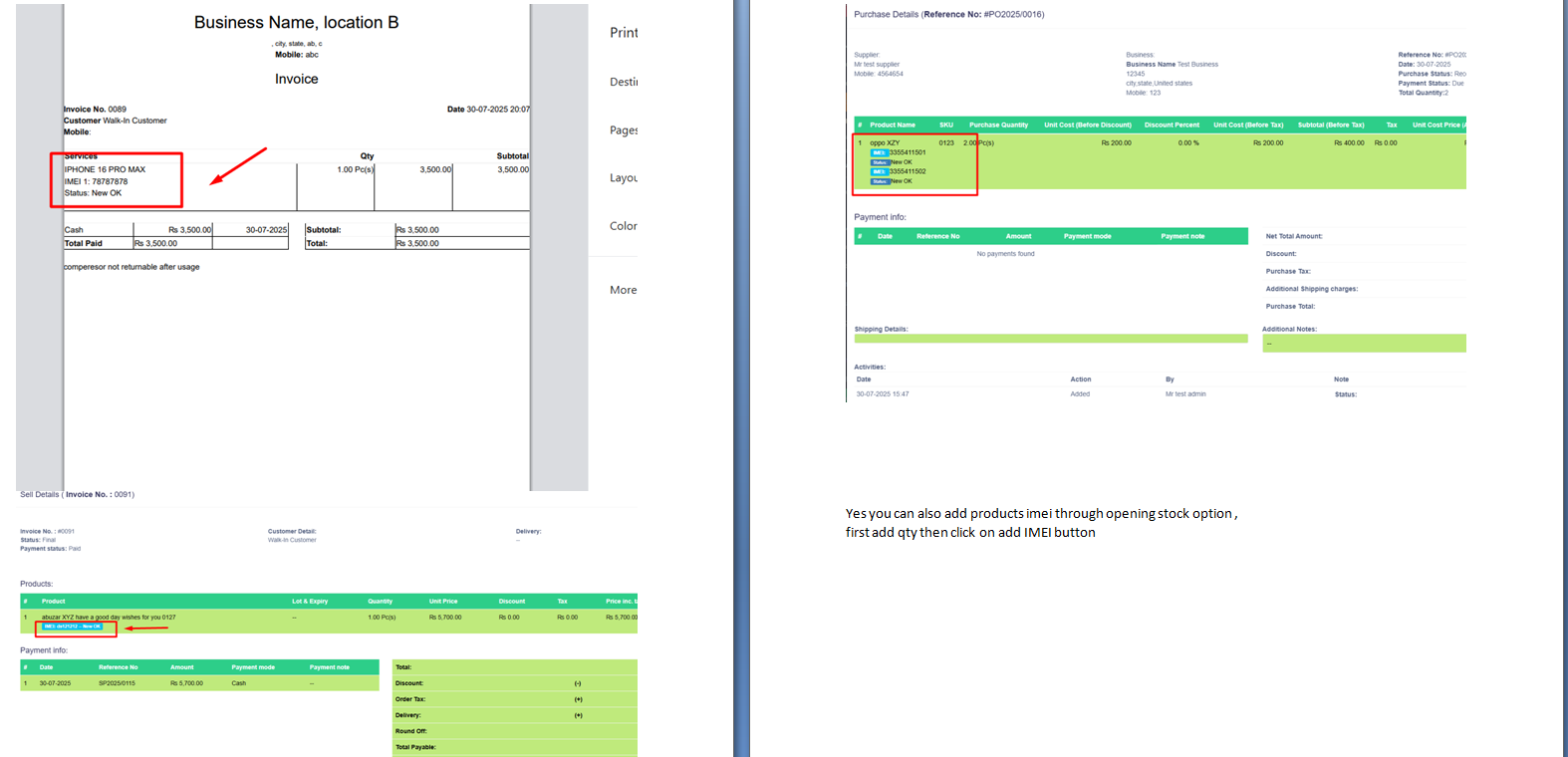
7. Invoice with IMEI Details
When customers purchase phones, their invoice must include the IMEI number for warranty and insurance purposes. This documentation proves ownership and simplifies any future service needs.
IMEI 1: 787878789
Status: New OK
Unit Price: $1,199.00
Warranty: 12 months manufacturer
Professional invoices with clear IMEI documentation build customer trust and reduce disputes. When everything is properly recorded, warranty claims and returns become straightforward.
Additional Features for Mobile Retailers
Warranty Tracking
Link warranty periods to each IMEI. When a customer returns with an issue, instantly verify if the device is still under warranty, what coverage applies, and any previous service history. This speeds up customer service and prevents warranty fraud.
Multi-Location IMEI Transfer
For retailers with multiple stores, transfer specific devices between locations while maintaining complete IMEI history. Know exactly where each phone is and track inter-store movements.
Repair and Service Integration
If you offer repair services, track repairs against customer device IMEIs. Record parts used, technician notes, and service costs. When the same customer returns, their complete device history is available instantly.
Supplier Performance by IMEI
Analyze which suppliers provide the best margins and fastest-selling inventory. Track defect rates by supplier—if phones from a particular source have more warranty claims, you have data to renegotiate terms or find better sources.
Transform Your Mobile Phone Business
LookPOS includes complete IMEI tracking, accessory management, and mobile retail features. Trusted by phone shops in USA, UK, UAE, Australia, Canada, and 25+ countries.
Start Free TrialFrequently Asked Questions
IMEI tracking in POS software allows mobile phone retailers to record, track, and manage unique device identifiers for every phone they purchase and sell. This enables warranty verification, theft prevention, inventory accuracy, and complete sales history for each device.
Essential features include IMEI/serial number tracking, device status management (new, used, repaired), warranty tracking, accessory inventory, barcode scanning, supplier management, customer credit ledger, and detailed profit reports per device and brand.
Yes, modern mobile shop POS systems can track warranty status for each device using IMEI numbers. You can record purchase date, warranty period, and automatically alert when warranty is expiring. This helps with customer service and returns processing.
IMEI scanning works by reading the barcode printed on phone boxes or device IMEI labels. When scanned during purchase or sale, the POS automatically identifies the product, records the unique IMEI, updates inventory, and maintains complete transaction history for that specific device.
Conclusion
Running a successful mobile phone shop requires more than basic retail software. You need a POS system that understands the unique challenges of the wireless industry—from IMEI tracking and warranty management to accessory inventory and supplier analysis.
The features outlined in this guide represent the minimum requirements for serious mobile retailers. When evaluating POS options, ensure the system handles individual device tracking, supports your specific workflow, and provides the reporting depth you need to optimize your business.
Ready to upgrade your mobile phone shop operations? Contact us for a personalized demonstration of how LookPOS handles IMEI tracking, accessory management, and everything else mobile retailers need. We serve wireless retailers across USA, UK, Canada, Australia, UAE, Europe, Asia, and the globe.